


Bambu Lab A2L Combo EX
The Bambu Lab A2L Combo EX is exactly what it sounds like—the A2L Combo with a little extra. With this bundle, you’ll receive the original A2L Combo plus 5 additional spools...
Frequently Bought Together
The Bambu Lab A2L Combo EX is exactly what it sounds like—the A2L Combo with a little extra. With this bundle, you’ll receive the original A2L Combo plus 5 additional spools of filament, so you can start printing right away without missing a beat.
Combo EX Includes
-
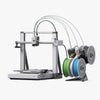 1x Bambu Lab A2L Combo
-
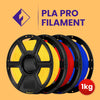 3x Filament 1.75mm PLA PRO - Flashforge (1kg)*
 -
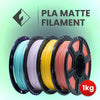 1x Filament 1.75mm PLA Matte - Flashforge (1kg)*
 -
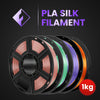 1x Filament 1.75mm PLA Silk - Flashforge (1kg)*
*Various Colours
Weights & Dimensions
- Printer Dimensions: 544 x 529 x 505 mm
- Printer Weight: 12.8 kg
Body
- Max Build Volume: 330 x 320 x 325 mm
- Chassis & Shell: Steel + Aluminum
- Outer Frame: Plastic
Tool Head
- Extruder Gears: Hardened Steel
- Nozzle: Stainless Steel
- Max Nozzle Temp: 300°C
- Nozzle Diameter: 0.4mm
- Filament Cutter: Yes
- Filament Diameter: 1.75mm
- Extruder Motor: Servo Extruder Motor:
- Compatible Filament: PLA | PETG | TPU | PLA-CF | PETG-CF | PVA
Heatbed
- Build Plate: Textured PEI
- Max Bed Temp: 80°C
Speed
- Max Travel Speed: 500 mm/s
- Max Acceleration: 10,000mm/s²
- Max Hot End Flow: 28 mm³/s @PLA (Model: 150 x 150 mm single wall;
Material: Bambu Lab PLA Basic; Temperature: 220°C)
Cooling
- Part Cooling Fan: Closed Loop Control
- Hot End Fan: Closed Loop Control
Sensors
- Monitoring Camera: Yes, Low Rate Camera (up to 1080P)
- Filament Run Out Sensor: Yes
- Filament Odometry: Yes
- Filament Tangle: Yes
- Power Loss Recover: Yes
- Clumping Detection: Yes
Electrical Requirements
- Voltage: 200-240 VAC, 50/60 Hz | 100-120 VAC, 50/60Hz
- Max Power: 1000W@220V | 1000W@110V
Electronics
- Display: 3.5 inches 320 x 240 IPS Touch Screen
- Connectivity: Wi-Fi | Bambu-Bus
- Storage: 32GB Micro SD Card
- Control Interface: Touch Screen | APP | PC Application
- Motion Controller: Single-core Cortex-M4 Processor & Single-core Cortex-M7 Processor
- Communication: Wi-Fi | Bambu-Bus
Software
- Slicer: Bambu Studio
- Slicer Supported OS: MacOS | Windows | Linux
What intelligent detection functions does the A2L have?
The A2L introduces the PMSM closed-loop servo extruder and a physical clumping detector, achieving more precise extrusion monitoring and reliable overflow (clog) protection. Furthermore, it fully inherits the well-received intelligent sensing system from the A1 series, including filament runout detection, air printing detection, and filament tangle detection.
What are the maximum nozzle temperature and heatbed temperature for the A2L?
Maximum nozzle temperature is 300°C, and maximum heatbed temperature is 80°C.
How loud is the A2L when printing?
The A2L features excellent quiet performance. In Silent Mode, the operating noise is below 49 dB (equivalent to a soft whisper in a library); even in Standard Mode, the peak noise is only about 52 dB. (Data sourced from Bambu Lab's laboratory)
The print area of the A2L heatbed is the same as the H2C's. Can I use the same build plate as the H2C?
Yes, the A2L and H2C can use exactly the same build plates.
What accessories are compatible between the A2L and A1?
Accessories that are compatible between the A2L and A1 include: the hotend, external spool holder, screen, heatbed nozzle wiper, and toolhead cutter.
Can the A2L be enclosed or used inside an enclosure?
The A2L has a built-in ambient temperature sensor. When the ambient temperature exceeds the threshold, the printer will issue an alert.
Therefore, enclosed printing of high-temperature materials is not recommended. However, if the ambient temperature can be kept within a reasonable range, enclosed use is acceptable.
How many AMS units does the A2L support, and how should they be connected?
The A2L offers powerful expandability, supporting up to 4 AMS units and 1 AMS lite connected in series, enabling complex colour printing with up to 19 colours (note: connecting an AMS unit will occupy one channel of the AMS lite). For details, please refer to: A2L AMS Connection Guide.
Can the AMS lite be top-mounted on the A2L's gantry to save space?
Yes, but doing so may increase machine vibration, which could affect the print quality of taller models.
Does the AMS drying function require an additional power source when used with the A2L?
Yes. Due to the A2L's power allocation limitations, the AMS 2 Pro requires connection to an external power adapter when using the drying function, and the AMS HT requires connection to its power cable. The AMS cannot draw power directly from the A2L printer for drying.